roadbook setup
Bluetooth Remotes for Digital Roadbook Navigation
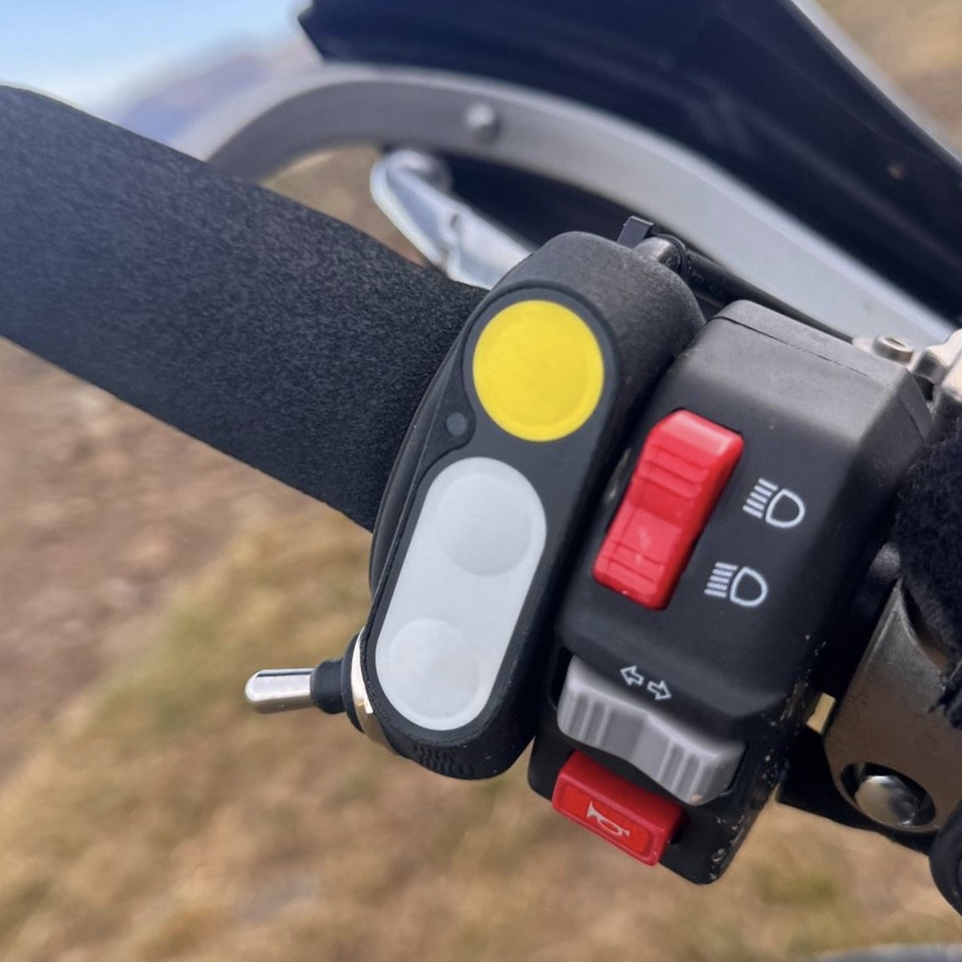
A Bluetooth remote is one of the best upgrades you can make to a digital roadbook setup. You can still navigate by touching the screen, but off-road, in gloves, or while standing on the pegs, handlebar controls make everything smoother.
This guide covers what to look for, which remote style suits different riders, and how to use one with TRBP.
Why use a Bluetooth remote?
Roadbook navigation is active. You are reading tulips, matching distances, watching notes and correcting trip distance as you ride.
A Bluetooth remote lets you do the key actions from the bars:
- Scroll the roadbook forward and back
- Adjust trip distance up and down
- Keep your hands closer to the controls
- Avoid tapping a dusty or wet screen with gloves
- Make training feel more like an event setup
For TRBP riders, that means more attention on the route and less attention on the device.
What matters most when choosing one?
The best Bluetooth remote is the one that fits your bike, your hand and your app. Check these before buying:
- Button layout: you should be able to scroll and adjust trip distance without looking down.
- Handlebar fit: check space beside grips, switchgear, mirror clamps and mounts.
- Weather resistance: dust, rain, mud and bike washing are normal roadbook conditions.
- Power: wired power suits long events; battery remotes are simpler for casual use.
- App modes: some controllers support roadbook, DMD2-style, map and media profiles.
- Firmware updates: useful if the manufacturer improves button mapping or app support.
Lever, joystick or buttons?
Most digital roadbook remotes use one of three layouts.
Lever remotes
Lever remotes feel closest to a traditional paper roadbook switch. They are intuitive for scrolling, especially if you want rally-style training. The downside is that the lever can be more exposed in crashes or tight trails.
Joystick remotes
Joystick remotes pack several actions into a small space. They are useful when handlebar space is limited, but test them with gloves and while standing, not just in the garage.
Button remotes
Button-only remotes are compact and usually easy to protect. The key is feel: if every button feels the same, it is easier to press the wrong one while riding.
Best remote type by rider
- New digital roadbook rider: start with a simple button remote.
- Rally training rider: choose a lever plus buttons for a more event-style feel.
- Adventure bike rider: look for a weather-sealed remote with multiple modes.
- Enduro rider: choose a low-profile button or joystick remote that is less exposed.
- Event rider: use a wired, weatherproof remote for long days and mixed conditions.
How it works with TRBP
The TRBP Roadbook app supports digital roadbook riding with roadbook scrolling and trip adjustment from compatible handlebar controllers.
A typical setup looks like this:
- Mount your Android phone or tablet securely.
- Pair the Bluetooth remote in Android settings.
- Open the TRBP app and load your roadbook.
- Download the roadbook before riding.
- Test scroll up, scroll down and trip adjustment before you leave.
If you already use a DMD2-compatible controller, read our guide to using a DMD2 controller with the TRBP Roadbook app.
If you are still building the full bike setup, start with building a digital roadbook navigation setup.
Common setup mistakes
The most common mistake is pairing the remote and assuming it is ready. Always open the roadbook and test every control before riding.
Check scroll direction, trip adjustment and whether the app still responds after the device has been idle. If the remote is wired, make sure the cable is secure and does not pull tight at full steering lock.
FAQ
Do I need a Bluetooth remote for digital roadbooks?
No. You can use TRBP without one. But off-road, in gloves or during rally training, a handlebar remote is a big improvement.
Is a lever better than buttons?
For classic rally feel, yes. For compact trail riding, buttons can be easier to protect.
Will any Bluetooth remote work?
Not always. Check compatibility before buying, especially if you want trip adjustment as well as scrolling.
Should I choose battery or wired power?
Battery remotes are simple. Wired remotes are better for long rides, events and training days where you do not want to think about charging another device.
What is the best first upgrade?
Start with a secure device mount and reliable power. After that, a Bluetooth remote is the upgrade that makes digital roadbook navigation feel most natural.
Final advice
Choose the remote you can use by feel. For most TRBP riders, that means simple scroll controls, reliable trip adjustment, weather resistance and a layout that works while standing on the bike.