roadbook apps
How to Choose a Digital Roadbook App
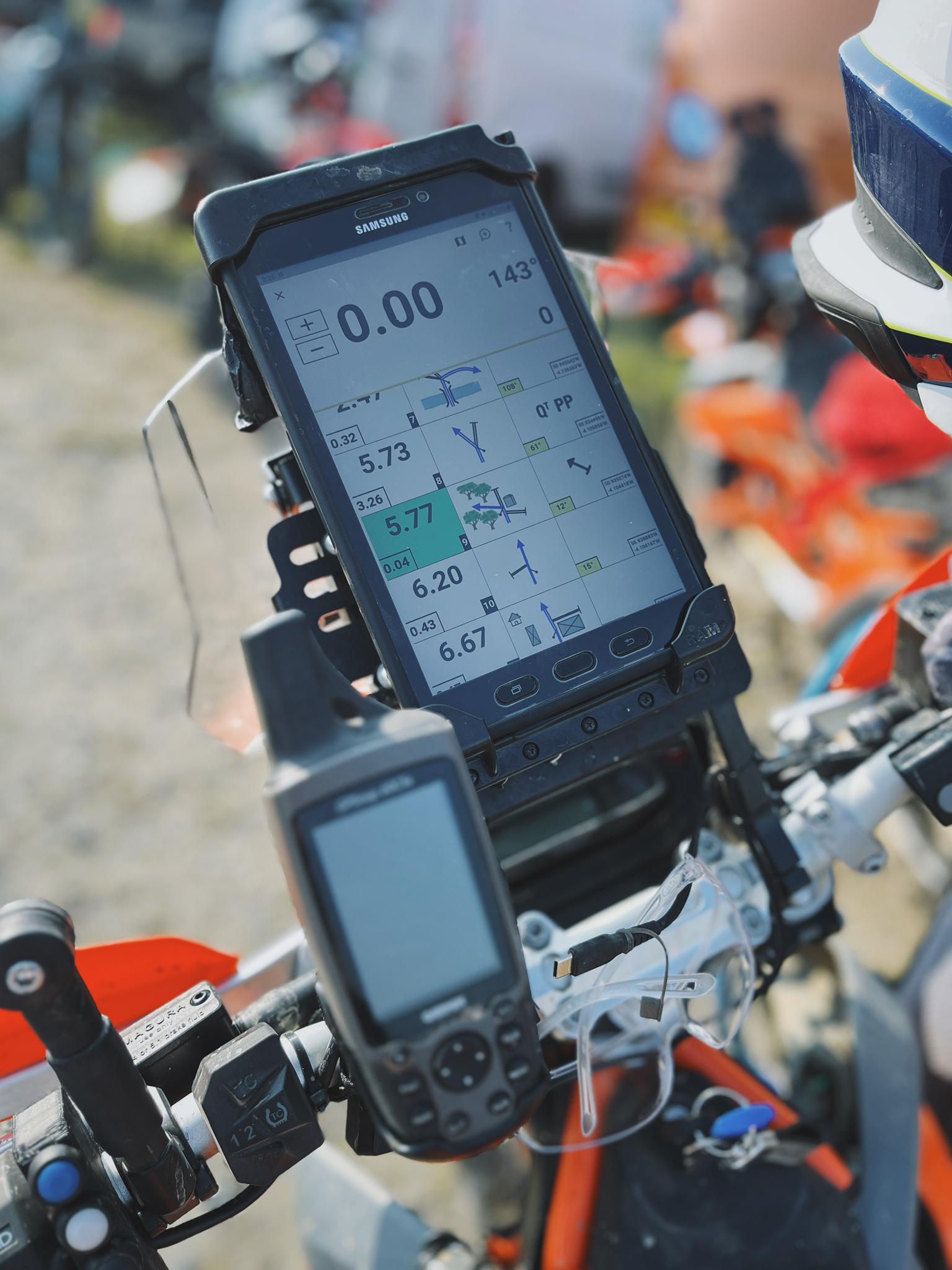
The best digital roadbook app depends on what you are trying to do. A rider opening an organiser-supplied PDF has different needs from someone looking for ready-to-ride routes, creating a new roadbook or reviewing scored practice sessions.
Rather than relying on a “top apps” list that becomes outdated, compare platforms by the job they perform and the features you will actually use on the bike.
Start with the type of roadbook riding
| Your goal | Features to prioritise |
|---|---|
| Ride a supplied event roadbook | Supported file format, offline access and dependable trip controls |
| Find ready-to-ride routes | A route library, clear route information and simple access in the app |
| Create roadbooks | Route-planning, tulip editing, distance calibration and export tools |
| Practise rally navigation | Repeatable routes, waypoints, speed zones, scoring and ride review |
| Run an event or challenge | Rider access, tracking, results, leaderboards and organiser controls |
Some platforms cover more than one of these jobs, but few are equally strong at all of them.
Seven questions to ask before choosing
1. Where do the roadbooks come from?
Check whether the app includes a route library, imports files supplied by organisers or expects you to create the route elsewhere. A capable reader is not very useful if it does not support the format you have been given.
2. Will it work on your existing device?
Confirm the operating system, minimum version, screen orientation and whether the app is designed for phones, tablets or dedicated navigation hardware. Also check how the screen behaves in bright light and with the device mounted on the bike.
3. Can you prepare before losing signal?
Roadbook routes often enter areas with unreliable mobile coverage. Confirm what must be downloaded or opened before the ride and test it with mobile data disabled.
4. How are trip corrections handled?
Distance will not always remain perfectly aligned. Look for clear trip adjustment and reset controls that suit the roadbooks you ride. Test them before the route rather than learning during a mistake.
5. Does it support handlebar controls?
If you ride in gloves or off-road, check support for the exact remote you intend to use. “Bluetooth support” does not necessarily mean every controller action will work.
TRBP supports roadbook scrolling and trip adjustment from compatible controllers. See the Bluetooth remote guide and the DMD2 controller guide for setup considerations.
6. Does it record or score the ride?
A reader may simply display the notes. A training or event platform may also validate waypoints, monitor speed zones, calculate penalties, publish results or provide a post-ride review.
Decide whether you only need navigation or want feedback that helps improve the next attempt.
7. What happens when something fails?
Understand how the app recovers after the screen sleeps, the device loses power or the connection to a controller is interrupted. The safest choice is the one you have tested on a short familiar route.
Reader, creator or training platform?
These categories are useful when comparing options.
Roadbook reader
A reader displays a roadbook created or supplied elsewhere. Prioritise file compatibility, reliable display, trip controls and offline preparation.
Roadbook creator
A creator helps an organiser or route maker build and edit instructions. Prioritise accurate distance tools, efficient tulip editing, version control and the export formats your riders require.
Route and training platform
A training platform connects the roadbook to the ride. It may provide ready-made routes, waypoint validation, speed zones, session history, scoring, leaderboards and feedback.
TRBP sits in this category: riders can choose from public roadbooks, navigate them in the Android app and review scored sessions afterwards.
A practical test before committing
Use the same short route or sample roadbook to test each serious option:
- Load the roadbook before leaving home.
- Mount the device and connect any controller.
- Test scroll and trip adjustment with riding gloves.
- Lock and wake the screen.
- Disable mobile data and confirm the roadbook remains usable as expected.
- Complete a few instructions on a familiar road.
- Check what ride data or feedback is available afterwards.
This reveals more than comparing long feature lists.
Common comparison mistakes
Treating every app as the same product
A creator, reader and scored-route platform may all call themselves roadbook apps while solving different problems.
Choosing by screen design alone
The interface matters, but so do route availability, offline preparation, trip correction, controller support and reliability on your hardware.
Assuming every roadbook format is interchangeable
Confirm compatibility with the routes or event files you expect to use. Do not assume that an app can open every roadbook source.
Buying hardware before testing the software
Try the intended app on your current Android device first. Then build a digital roadbook setup around a workflow you know works.
Which digital roadbook app should you choose?
Choose the platform that matches the complete riding job, not the one with the longest feature list.
If you want ready-to-ride UK routes, navigation, scored sessions and post-ride feedback in one system, browse TRBP roadbooks and get TRBP Navigator. If an organiser supplies a different format, choose a reader explicitly compatible with that file and test it before the event.